
MyOpenDoor Translate vs. Streamlingo, Wordly, Glossa, OneAccord, Kaleo AI, LiveVoice & Breeze for churches
If you’re comparing live translation services for your church, you’ve probably found the same eight names on this page — including us. Below is the full feature-by-feature comparison: everything MyOpenDoor Translate does, set next to what Streamlingo, Wordly, Glossa, OneAccord, Kaleo AI, LiveVoice, and Breeze Translate publish on their own websites. Every competitor cell comes from that company’s own public site, quoted as published. Where a provider doesn’t publish something, the table says not published — that means the feature doesn’t appear on their public pages, not that they can’t do it. We don’t guess, and we don’t invent claims about anyone.
Jump to: the full comparison table · Streamlingo alternatives · Wordly alternatives · Glossa alternatives · OneAccord alternatives · Kaleo AI alternatives · LiveVoice alternatives · Breeze Translate alternatives
The short version
All eight services solve the same core problem the same modern way: the preacher’s voice feeds an AI translation engine, and guests follow along on their own phones — no receivers, no headsets to hand out. Every one of them gives listeners a browser join with nothing to install; Kaleo AI and LiveVoice offer a native app as well. The differences are everything around that: how many languages, what the engine does to protect the sermon’s exact words, what your guests see on their screens, what happens after the service ends, and whether you can price it without a sales call. That’s what the table below covers, row by row.
The full comparison
| MyOpenDoor Translate | Streamlingo | Wordly | Glossa | OneAccord | Kaleo AI | LiveVoice | Breeze Translate | |
|---|---|---|---|---|---|---|---|---|
| Live caption languages | 190+ | 80+ | 60+ | 100+ | 50+ | 150+ on the Unlimited plan (2–4 on Starter and Pro) | “Over 70 languages”; interpreter channels “as many as you want” | Nearly 200 |
| Natural spoken voice | ✓ — 60+ languages | ✓ — audio and transcription | ✓ — audio translation | ✓ — listen or read | ✓ — written and audio | ✓ — “listen with headphones” through the listener app | ✓ — “AI Voice & Text Translation” (sold separately from AI Live Captions); human interpreters also offered | ✓ — live captions and spoken translation on the guest’s phone |
| QR join, no app | ✓ — scan and join in the browser | ✓ — QR code, “runs right in the browser” | ✓ — QR code or link | ✓ — any modern browser | ✓ — scan, pick a language, play | ✓ — QR code in a browser; a free listener app (App Store and Google Play) is also published | ✓ — link, invite code, location or QR code; audience “can join through an app or web browser” | ✓ — “no apps to download”, works on any device; guests scan with their own phone |
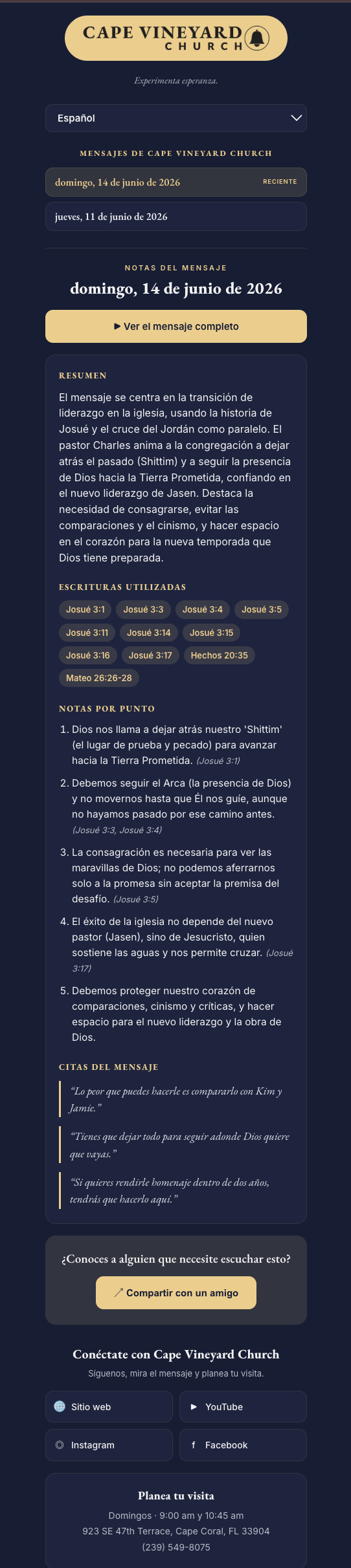
| Sermon Notes Hub — full translated notes page after every service (scriptures, summaries, memorable quotes) | ✓ — you pick the languages, the page builds itself | Not published on their site | Not published on their site | Not published on their site | Not published on their site | Not published on their site | Not published on their site | Not published on their site |
| Auto-translated announcements | ✓ — rotate on the lobby display in multiple languages at once | Not published on their site | Not published on their site | Not published on their site | Not published on their site | Not published on their site | Not published on their site | Not published on their site |
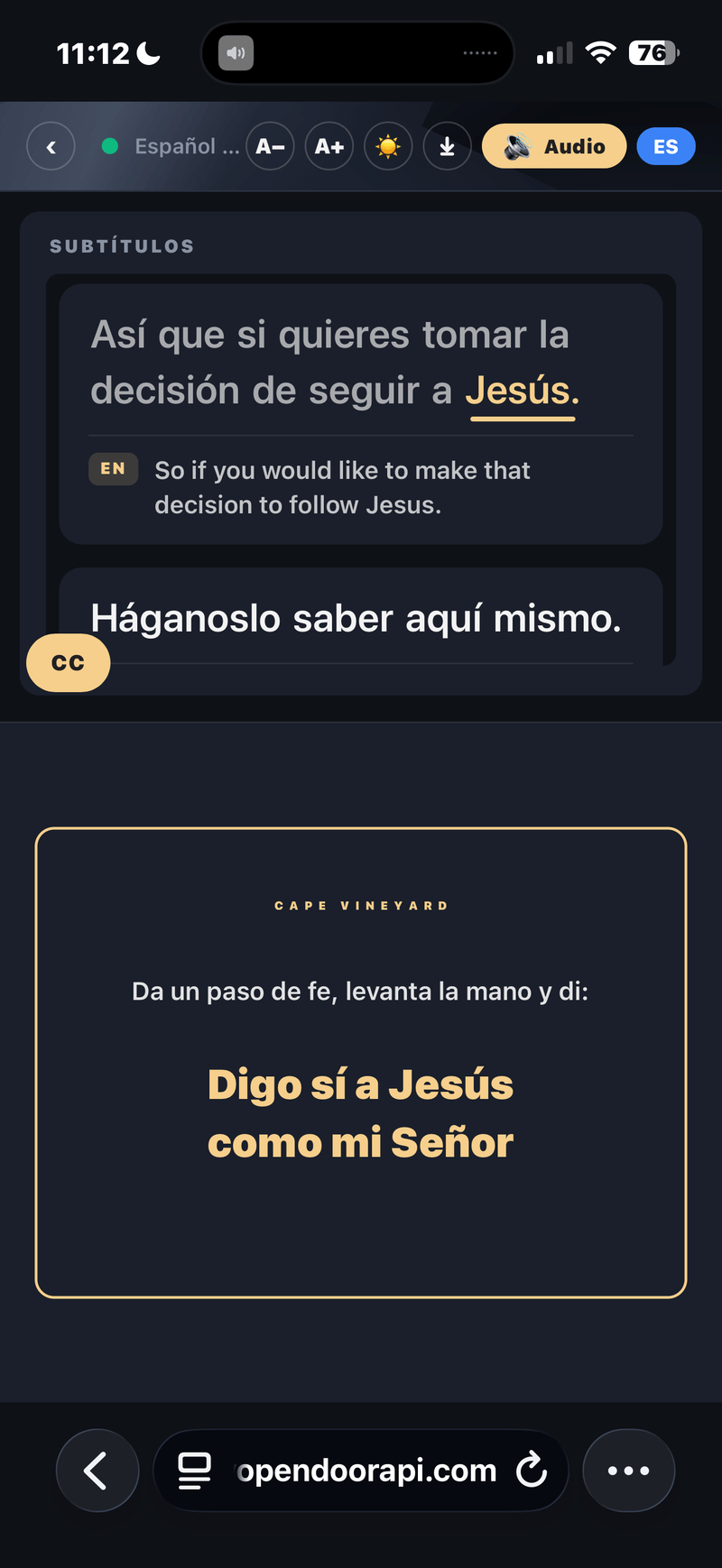
| Interactive cards — decision / altar-call cards, connection cards, polls, RSVPs | ✓ — one tap from the booth puts the card on every screen, each in its own language | Not published on their site | Not published on their site | Not published on their site | Not published on their site | Not published on their site | Not published on their site | Not published on their site |
| Word-by-word voice highlighting | ✓ — a gold highlight follows the voice, word by word | Not published on their site | Not published on their site | Not published on their site | Not published on their site | Not published on their site | Not published on their site | Not published on their site |
| Branded listener experience — your church’s name, logo, and colors on every guest’s screen | ✓ | Not published on their site | Not published on their site | Not published on their site | ✓ — branded URLs and church logo | Not published on their site | Not published on their site | Not published on their site |
| Engine integrity — never paraphrases the preacher | ✓ — proprietary MODVOICE engine: rejoins sentences the recognizer split, removes filler, never finishes the speaker’s sentence for them | Not published on their site | Not published on their site | Not published on their site | Not published on their site | Not published on their site | Not published on their site | Not published on their site |
| Church glossary — your own names and Bible terms taught to the engine | ✓ — two glossaries: a built-in Bible glossary with every book, name and place, plus your church’s own names and terms — no limit on how many | ✓ — “Christian glossary”, “Biblical terms translated precisely” | ✓ — customizable glossaries | ✓ — “Biblically-trained AI” | ✓ — “trained for a church context so it understands biblical terminology” | ✓ — “custom-trained to recognize theological words and Bible names” | Not published on their site | Not published on their site |
| Transcripts after the service | ✓ — plus the Sermon Notes Hub above | Live transcription; after-service not published | ✓ — transcripts + short summaries | ✓ — transcripts | ✓ — downloads in original + translated languages | Not published on their site | ✓ — recording | Not published on their site |
| Custom cloned voice | ✓ — optional paid add-on, any plan | Not published on their site | Not published on their site | ✓ — on Advanced and Premium tiers | Not published on their site | Not published on their site | Not published on their site | Not published on their site |
| Every feature on every plan | ✓ — no feature gating, booth seats included | Tiered by hours, with per-language and per-listener metering on top | Not published on their site | Features tiered (voice cloning and integrations listed on Advanced+ plans) | Not published on their site | Tiered — 2–4 languages on Starter and Pro, 150+ on Unlimited | Tiered day plans (LIGHT / SMART / PRO), with AI voice, text, and live captions metered per minute per language on top | Plans differ by coverage and languages (Basic “typically a couple of languages”; Abundant tiers unlimited languages) |
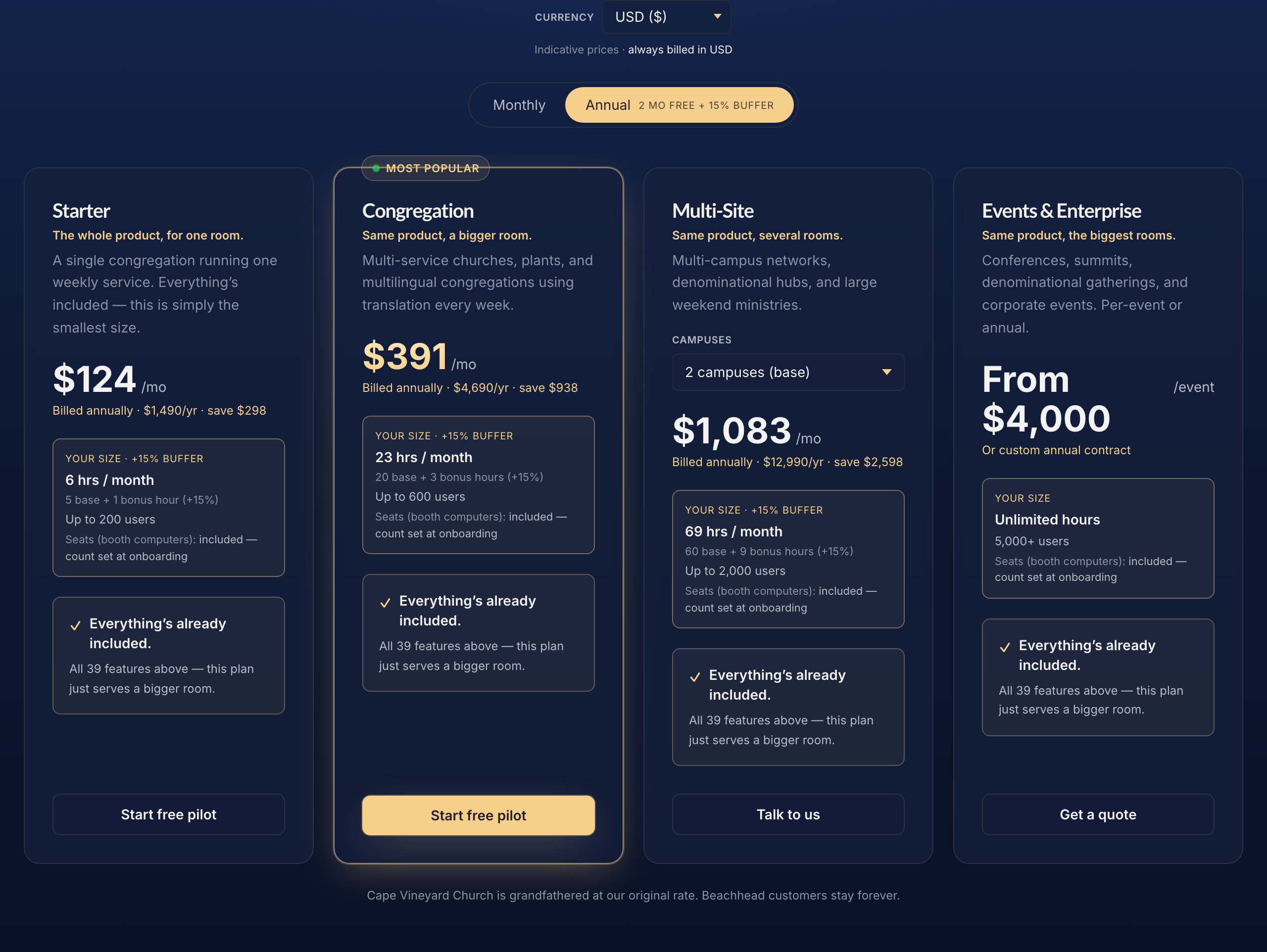
| Published pricing | Full — every tier on the pricing page | Full — four tiers on their site | Partial — “starts at about $1,500”; tiers by annual hours | Full — all tiers on their site | Partial (“from” price only) | Full — three tiers on their site | Full — day rates plus per-minute AI rates on their site | Full — weekly plans on their site |
| Entry price | From $19.99/mo; Church $149/mo — 6 hrs, 3 languages, all features | Free tier (1 h of AI translation); Small €44/mo — 5 h, +€11/h per language, listening metered per listener | About $1,500/yr — 10 hours, valid 12 months | $99/mo — 25 hrs (or $5/hr per language pay-as-you-go) | From $150/mo — 5 hrs | $24/mo — 5 hrs (+$2/hr over) | From €8 / $10 per day (LIGHT); SMART from €13 / $16; PRO from €26 / $32 — plus AI at €0,42 / $0.52 per minute per language (voice & text) or €0,16 / $0.21 (live captions) | $8/wk — one Sunday service, typically a couple of languages ($3/wk captions only; $15/wk all Sunday services; $20/wk including midweek) |
| Setup fee | $0 | Not published | Not published | Not published | None (“No setup fees”) | Not published | Not published | Not published |
| Free trial | A weekend of services, no card | Free plan — 1 h of AI translation, 10 h of listening | Not published | 4 hours free | Free credits on request | Four free hours of captions and translations | Free test plan, up to 3 participants | Free account — “try free”, no credit card required |
| Listeners | 200–2,000 by plan (5,000+ for events) | Listening hours metered per listener (250 h included on Small) | Not published | Unlimited (not charged per listener) | Pricing scales with users | Unlimited — “no limit to the number of church members who can tune in” | Not published | Not published |
Every competitor cell is taken from that company’s own public site — streamlingo.net, wordly.ai, glossa.live, oneaccord.ai, withkaleo.com, livevoice.io and breezetranslate.com — all re-read on 4 September 2026. “Not published on their site” means exactly that — the feature doesn’t appear on their public pages; it is not a claim about what they can or can’t do. If anything here has changed on their sites, tell us and we’ll correct it.
What the table means for a Sunday morning
Rows on a comparison table are abstract until you picture the service. Here is what the rows only we publish look like in the room:
- Language coverage, published as a number. Live captions in 190+ languages and natural spoken voice in 60+. Breeze Translate publishes a comparable figure (nearly 200); Kaleo AI lists 150+ on its top plan, Glossa 100+, Streamlingo 80+, LiveVoice “over 70”, Wordly 60+, and OneAccord 50+. If your congregation includes languages outside the usual top twenty, this row is the difference between “covered” and “not covered” — so check the count each provider publishes, and check how many of those carry spoken voice, not just captions. New languages can typically be added to ours within a couple of days.
- An engine that never paraphrases. Our proprietary MODVOICE engine was built for live preaching: a sentence the recognizer split in half gets rejoined, filler words are cleaned up, and the engine never finishes the speaker’s sentence for them. The words your guests receive are the preacher’s words — that’s the integrity rule the whole engine is built around, and none of the other seven publish an equivalent commitment. Several do publish a church glossary or Bible-trained recognition — Streamlingo, Wordly, Glossa, OneAccord and Kaleo AI — and that row is in the table, because it is a real strength and you should weigh it. Ours runs two: a built-in Bible glossary with every book, name and place, and your church’s own list with no limit on how many terms it holds.
- The service doesn’t end at the benediction. After every service, the Sermon Notes Hub auto-generates a full translated notes page — scriptures, summaries, memorable quotes — in the languages you pick. During the service, announcements rotate on the lobby display in multiple languages at once. None of the other seven publish anything like it.
- Guests can respond, not just understand. Decision and altar-call cards, connection cards, polls, and RSVPs — one tap from the booth puts the card on every phone in the room, each in that listener’s own language. This is the row we’d ask you to weigh most heavily, because it changes what translation is for: not just following the sermon, but responding to it.
- The screen belongs to your church. Every listener’s screen carries your church’s name, logo, and colors — a guest’s first impression is your church welcoming them, not a vendor’s app. And a gold word-by-word highlight follows the voice as it speaks, so readers and listeners stay on the same word together.
- Everything published, every plan complete. Our pricing page shows every tier, every number: $19.99/month entry, $0 setup, published per-plan overage from $25/hr, a 15% nonprofit discount on Church and Congregation, and every feature included on every plan — no feature gating, booth seats included. You can price your church without talking to anyone.
Looking for a Streamlingo alternative for church?
Streamlingo is a German-built live translation service (prices are published in euros and include VAT) that serves churches alongside conferences and universities, and it is the one on this page most likely to sit next to us in a search result. Its church page publishes 80+ languages, a QR join that “runs right in the browser”, a “Christian glossary” with “Biblical terms translated precisely”, and the option to combine AI with live interpreters and the original audio on one system. Pricing is fully published in four tiers: a free plan with 1 hour of AI translation and 10 hours of listening, then Small at €44/month (5 hours), Medium at €120/month (15 hours) and Large at €288/month (40 hours), with annual discounts.
The fit question is the meter. On every Streamlingo tier, extra translation is billed per hour per language (from €20/h on the free plan down to €9/h on Large), and listening is billed per hour per listener once the included listening hours run out (€0.10–€0.20 per listener-hour). A church that runs two services, three languages and a hundred listeners should work its own number from those rates before setting it beside a flat monthly price. No after-service feature — transcripts, notes, summaries — appears on its church page.
Where MyOpenDoor Translate differs, by published numbers: live captions in 190+ languages with natural spoken voice in 60+ against Streamlingo’s 80+; one flat monthly price ($19.99/month entry, $0 setup, 15% nonprofit discount on Church and Congregation) with listener caps published per plan instead of per-listener metering; and the church-specific layer after the benediction — a translated Sermon Notes Hub, auto-translated announcements, and decision, altar-call and connection cards. If you want interpreters and AI on one console with a European invoice, Streamlingo is a genuine fit. If you want a fixed number and the after-service layer, run a real service on our free weekend trial and compare.
Looking for a Wordly alternative for church?
Wordly is one of the best-known names in live event translation, so it’s often the first service a church evaluates — and “Wordly alternative for church” is a search many worship and tech directors end up running. The usual reasons aren’t complaints; they’re fit questions. Wordly publishes a starting figure — “pricing starts at about $1,500” for 10 hours a year — and tiers by annual hours from there, so a church that wants a full monthly price list still has to ask. Its published language count is 60+, which covers most congregations but not all. And its public pages describe event translation — transcripts and short summaries after the fact — rather than church-specific features like sermon notes, translated announcements, or response cards. None of that makes Wordly a wrong choice; it means the right choice depends on what your church needs.
Whatever alternative you evaluate, compare the same rows the table above uses: language coverage, how listeners join, what guests see on their screens, what happens after the service ends, published pricing and trial terms, and listener capacity — and read each pricing page the way we lay out in choosing a church translation company.
Where MyOpenDoor Translate differs, by our own published numbers: live captions in 190+ languages with natural spoken voice in 60+; every price published ($19.99/month entry, $0 setup, 15% nonprofit discount on Church and Congregation), so you can budget without a sales call; and a feature set built around the whole arc of a church service — a translated Sermon Notes Hub after every service, announcements rotating in multiple languages, and decision, altar-call, and connection cards (plus polls and RSVPs) guests answer in their own language. If that’s the shape of alternative you’re looking for, see the full pricing or talk to us — and the honest test for any provider on this page is a real service, which our free weekend trial exists for.
Alternatives to Glossa
Glossa publishes full pricing ($99/month for 25 hours) and lists 100+ languages, with some features — voice cloning and integrations — listed on its Advanced and Premium tiers. If you’re comparing alternatives, weigh that against services that include every feature on every plan and publish wider language coverage; the table above sets all eight side by side.
Alternatives to OneAccord
OneAccord lists 50+ languages, branded URLs with your church logo, no setup fees, and pricing “from $150/month” for 5 hours, with pricing that scales with users. If you’re evaluating alternatives, compare published language counts, full (not “from”) pricing, and what each service produces after the service ends — all covered row by row in the table above.
Alternatives to Kaleo AI
Kaleo AI is captions-first and priced for a small church: Starter at $24/month for 5 hours, Pro at $49/month for 10 hours, Unlimited at $149/month with unlimited hours, all published. Captions are “always available in the original speaker language for deaf and hard-of-hearing church members”, translation runs to 2–4 languages on the lower plans and 150+ on Unlimited, the recognizer is “custom-trained to recognize theological words and Bible names”, and guests join by QR in a browser — with a free listener app on the App Store and Google Play as an option that adds Bluetooth hearing-aid support. Kaleo publishes four free hours to try it and says listeners can “listen with headphones” through its app; listeners are unlimited on every plan (“no limit to the number of church members who can tune in”); nothing after the service is published. If your need is captions for the hard of hearing plus a few languages on a tight budget, Kaleo’s $24 is hard to argue with. If your guests need to hear the sermon in their language, compare the voice row: Kaleo’s listening runs through its app, ours publishes natural spoken voice in 60+ languages in the browser on every plan.
A note on Sermon Live: as of September 2026 its site redirects to an announcement that it is being retired as a standalone product, so it is not in the table.
Alternatives to LiveVoice
LiveVoice is the one service on this page that publishes both sides of the problem: its pages offer “human or AI live translation”, with “AI Voice & Text Translation” and “AI Live Captions” listed as separate items. If your church already works with live interpreters and wants one platform that carries interpreters and AI together, that combination is the real reason to look at it. It is used at scale — its site lists 40,000+ admin users, 4,000+ clients, and 150,000+ events — and it publishes its prices as day rates: LIGHT from €8 / $10 per day, SMART from €13 / $16, PRO from €26 / $32. It also says special conditions for NPOs and churches are available, without quantifying them.
Two fit questions are worth settling before you compare it on price. First, the AI is metered per minute per language on top of the day rate — €0,42 / $0.52 per minute per language for Voice & Text, €0,16 / $0.21 for Live Captions — so the day rate is not the whole cost. A longer service, or one more language, moves the total. Work out your own number from your actual service length and language count before you set it beside anything billed monthly. Second, LiveVoice publishes native apps for iOS, Android, and Huawei alongside the browser: its AI translation page now says the audience “can join through an app or web browser on their own devices”, so a first-time guest does not have to install anything — an earlier version of this page said LiveVoice did not state this; it does now, and we have corrected it.
Where MyOpenDoor Translate differs, by published numbers only: we publish live captions in 190+ languages and natural spoken voice in 60+, where LiveVoice publishes “over 70 languages” for its AI translation; we publish one flat monthly price ($19.99/month entry, $0 setup, 15% nonprofit discount on Starter and Congregation) instead of a day rate plus per-minute metering, so your cost doesn’t move when the sermon runs long; and the church-specific layer — a translated Sermon Notes Hub after every service, auto-translated announcements, and decision, altar-call, and connection cards — doesn’t appear on their pages. If you want interpreters and AI on one platform, LiveVoice is a genuine fit. If you want a fixed monthly number, run a real service on our free weekend trial and compare.
Alternatives to Breeze Translate
Breeze Translate is built for the same room we are. It works in nearly 200 languages, with “no apps to download” on any device — guests scan with their own phone and both live captions and spoken translation appear there. Its setup instructions are written for a church: connect your sound desk to a laptop, or place a phone on the lectern, and open Breeze in a browser. And its pricing is published by the week on its pricing page: $8 for Basic (one Sunday service, typically a couple of languages), $15 for Abundant Sundays (all Sunday services, unlimited languages), $20 for Abundant All Week (midweek, youth night, small groups, unlimited languages across the week), and $3 for Translation-Ready Captioning if you only want captions. There is a free account, no credit card required, and no long-term contract. Its site also publishes a weekly usage figure (235 churches across 104 languages on a recent Sunday) and says it is built and maintained by volunteers who began at a Christian-ministry hackathon.
That is materially cheaper than our $149/month Church plan, and we won’t spin it. If published price is the deciding factor for your church, Breeze wins that row outright, and a small congregation that needs one Sunday service in two languages should look hard at $8 a week before it looks at us.
What we would ask you to weigh against price is what is included and what happens after the benediction. Breeze doesn’t publish a setup fee, a listener capacity, or a nonprofit discount; we publish $0 setup, listener caps by plan (200–2,000, and 5,000+ for events), and a 15% nonprofit discount on Starter and Congregation. Breeze’s entry plan is described as typically a couple of languages, with unlimited languages on the higher tiers; every feature on every one of our plans is included, with booth seats in the price. We publish natural spoken voice in 60+ languages as a number. And the whole after-service layer — a full translated Sermon Notes Hub, auto-translated announcements rotating on the lobby display, and decision, altar-call, and connection cards guests answer in their own language — doesn’t appear on their public pages. Both services are free to try, so don’t settle it on a table: run a real service on each and let your congregation tell you.
The bottom line
Any of these eight will get translated words onto your guests’ phones on Sunday. Only one was built around the whole arc of a church service — welcome, sermon, response, follow-up — and publishes every price, every cap, and every feature so you can verify all of it before you ever talk to a person. Don’t take our word for the table above: check every cell against each provider’s own site, then check ours. And the best way to decide is the same for any service on this page — run a real one. Ours is free for a weekend, no card required.
Frequently asked questions
Which church translation service supports the most languages?
Going by each provider’s own published numbers: Breeze Translate says it works in nearly 200 languages, MyOpenDoor Translate offers live captions in 190+ languages with natural spoken voice in 60+, Kaleo AI lists 150+ on its Unlimited plan (2–4 on its lower plans), Glossa lists 100+, Streamlingo 80+, LiveVoice publishes “over 70 languages” for its AI translation (and says you can add as many interpreter channels as you want), Wordly lists 60+, and OneAccord 50+. Those are the published figures; check them against each provider’s site before you decide, and check which of them are caption languages and which carry spoken voice.
Which church translation service is cheapest?
On published price, Breeze Translate is the lowest: $8 per week for one Sunday service, $15 per week for all Sunday services, $20 per week including midweek, and $3 per week for captions only. Then Kaleo AI at $24/month for 5 hours, Streamlingo with a free tier (1 hour of AI translation) and a Small plan at €44/month for 5 hours plus per-language and per-listener metering, Glossa at $99/month for 25 hours or $5 per hour per language pay-as-you-go, OneAccord “from $150/month” for 5 hours, and MyOpenDoor Translate from $19.99/month, with the Church plan at $149/month for 6 hours and up to 3 languages (5 on Congregation, 7 on Multi-Site — published per tier, not discovered later). LiveVoice publishes day rates — from €8 / $10 (LIGHT), €13 / $16 (SMART), €26 / $32 (PRO) — and meters its AI on top at €0,42 / $0.52 per minute per language for voice and text and €0,16 / $0.21 for live captions. Wordly publishes “pricing starts at about $1,500” for 10 hours a year, with a 10% nonprofit discount on its Pro tier and up. We are not the cheapest of the eight, and we won’t claim to be. What our price buys is what is included — every feature on every plan, booth seats included, $0 setup fee, and a 15% nonprofit discount on Church and Congregation plans — plus the church-specific layer after the service. Compare on language coverage, listener capacity, and what each plan actually includes, not sticker price alone.
Do any of these require an app, headsets, or receivers?
None of the eight require dedicated receiver hardware, and all eight publish a browser join for listeners — guests open a QR code or link on their own phone, pick a language, and read or listen with nothing to install. Two also offer a native app alongside the browser: Kaleo AI publishes a free listener app on the App Store and Google Play, and LiveVoice publishes apps for iOS, Android and Huawei and says the audience “can join through an app or web browser”.
Which service does the most after the service ends?
Four of the eight publish a written record: Wordly publishes transcripts and short summaries, Glossa publishes transcripts, OneAccord offers transcript downloads in the original and translated languages, and LiveVoice lists recording among its features. No after-service feature appears in what Streamlingo, Kaleo AI or Breeze Translate publish. MyOpenDoor Translate is the only one of the eight that publishes a full Sermon Notes Hub — an auto-generated, fully translated notes page after every service with scriptures, summaries, and memorable quotes, in the languages you pick.
What is the best Wordly alternative for churches?
It depends on what your church needs. All eight services on this page deliver live browser-based translation with a QR join; Streamlingo, OneAccord and LiveVoice also publish human-interpreter support alongside the AI. MyOpenDoor Translate is one alternative built specifically for church services: by our own published numbers, live captions in 190+ languages with natural spoken voice in 60+, full pricing published on the site ($19.99/month entry, $0 setup, 15% nonprofit discount on Church and Congregation), and church-specific features the others don’t list — a translated Sermon Notes Hub after every service, auto-translated announcements, and interactive decision and connection cards. If published price is your deciding factor, Breeze Translate publishes the lowest at $8–$20 per week. The fairest test is to compare each provider’s site against your own needs, then run a real service on a trial.
Can I try these services before committing?
MyOpenDoor Translate offers a free trial covering a weekend of services with no card required. Streamlingo publishes a free tier with 1 hour of AI translation included. Breeze Translate offers a free account with no credit card required and no long-term contract. Glossa advertises 4 free hours, Kaleo AI publishes four free hours of captions and translations, OneAccord offers free trial credits on request, and LiveVoice publishes a free test plan for up to 3 participants. Wordly doesn’t list a trial on the pages we read — contact them directly.
Related reading: how much church translation costs and how to translate a church service live. See how churches use the engagement layer on the churches page, or start with the overview of live translation for church services.