
How to Translate a Church Service in Real Time: The Complete Guide (2026)
There are exactly three ways to translate a church service live: a human interpreter, dedicated interpretation hardware, or an AI live-translation platform that puts captions and a spoken voice on each listener’s own phone. If you’re researching how to translate sermons in real time, this guide walks through all three honestly — what each costs, what each takes to run, how to deliver the translation to the room and beyond, and how to set up your first translated service step by step.
What “translating a church service” means today
Twenty years ago, a church translation system meant a booth, a stack of receivers, and a volunteer interpreter whispering into a headset. Today the most common setup is one microphone and the phones your guests already brought: whoever is preaching speaks normally, and each listener follows along in their own language — as live captions on their screen, a natural spoken voice in their earbuds, or both at once.
The shift matters because the old model quietly excluded people. There were never enough headsets, never enough interpreters for every language in the room, and the back row got left out. Phone-based translation scales to the whole congregation and to every language at once — and it removes the weekly burden of finding, scheduling, and paying a person per language.
If you want the shorter version — what church translation replaces, what it costs a church to run, and the objections your AV team and your interpreters will raise — that lives on our churches page, alongside a plain overview of live translation for church services. This guide is the long way round: how to actually run it.
The three options, honestly compared
Option 1: Human interpreters
The traditional answer, and still the right one for some settings. A trained interpreter — simultaneous (speaking over the sermon from a booth or a corner) or consecutive (the preacher pauses, the interpreter repeats) — brings real human judgment, handles humor and idiom well, and is a pastoral presence in their own right.
The tradeoffs are structural, not quality problems. Each interpreter covers exactly one language, every week, forever — so a church with Spanish, Korean, and Portuguese speakers needs three skilled people every Sunday. Professional interpreters bill per service; volunteer interpreters vary widely in skill and burn out. Consecutive interpreting doubles the length of everything said. And whisper interpreting only reaches the two or three people sitting next to the interpreter.
Option 2: Dedicated interpretation hardware
The middle era: an interpreter speaks into a transmitter, and listeners wear dedicated radio (FM) or infrared receivers with headsets. The audio is reliable, it works without internet, and no one needs a smartphone.
But the hardware doesn’t remove the interpreter — it just amplifies one. You still need a human per language, plus a channel per language, plus the receivers themselves (often a couple hundred dollars each), purchased in advance for a crowd size you have to guess. Someone charges them, sanitizes them, hands them out, and chases them down after the benediction. Your capacity is capped by the number of receivers in the bin, and adding a language means buying more equipment and finding another interpreter.
If you are pricing that stack up — receivers, transmitter, chargers, the spares you buy because some always walk off — we laid the two stacks side by side in church translation equipment: what you actually need — what the receiver route really involves, whether the translation devices and translator earbuds people ask about work in a sanctuary, and the one case where the old hardware still wins.
Option 3: AI live-translation platforms
The current generation: the preacher’s microphone feeds a translation service, and the service delivers live captions and a synthesized natural voice to every listener’s own phone. Guests scan a QR code, tap their language, and they’re in — no app, no account, no headset, nothing to hand out or collect.
The strengths are the mirror image of the other two options: one broadcast covers many languages simultaneously, capacity scales with the congregation instead of a hardware bin, there’s no weekly staffing burden, and you get a transcript of every service. The honest tradeoffs: you need a clean audio feed and a working internet connection, machine translation must be controlled with a glossary so names and theological terms come out right, and quality varies meaningfully between platforms — some quietly paraphrase, which matters more in a sermon than almost anywhere else (more on that below). If you get to this option, our side-by-side comparison of church translation services looks at six platforms feature by feature.
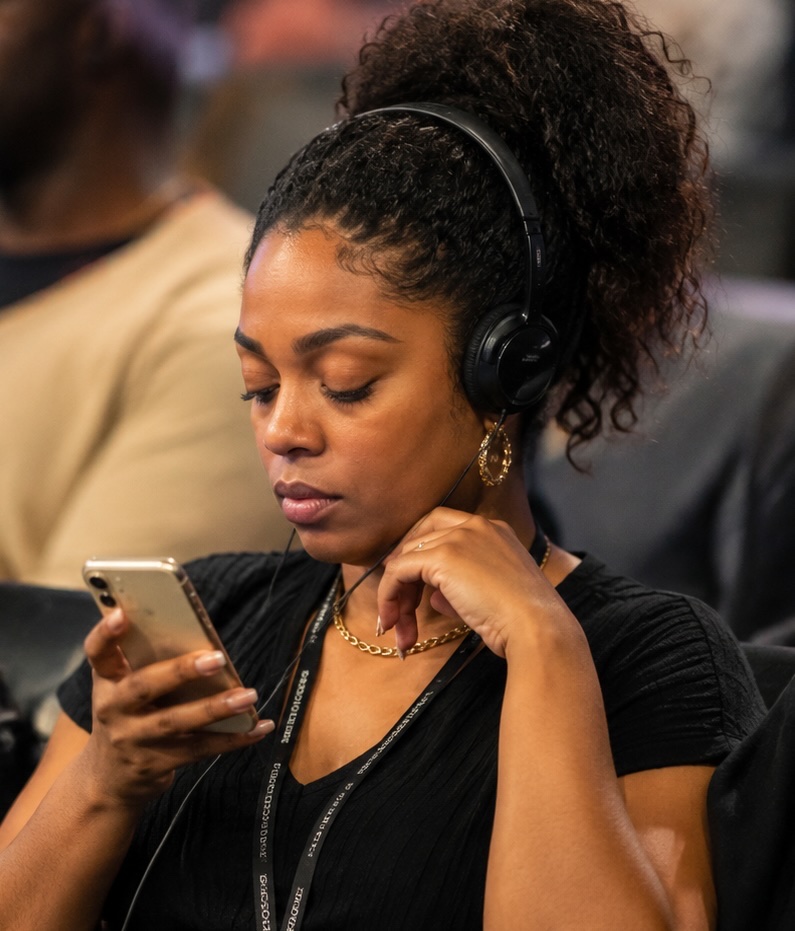
This is also the option you can see for yourself rather than take on our word: the demonstration on our home page plays a recorded sermon with the English on your screen and the Spanish on your phone, so you can watch what a guest actually reads and hears before you talk to anyone.
| Human interpreters | Interpretation hardware | AI platform | |
|---|---|---|---|
| Up-front cost | None | Receivers + transmitter, bought in advance | None |
| Ongoing cost | Per service, per language, every week | Interpreter fees + equipment upkeep | Monthly subscription |
| Languages at once | One per interpreter | One per channel + interpreter | Many simultaneously |
| Weekly logistics | Schedule people | Charge, distribute, collect receivers | Show a QR code |
| Capacity | A few listeners per whisper interpreter | Capped by receivers owned | The whole congregation |
| Record afterward | None | None | Full transcript |
One more honest note: these aren’t mutually exclusive. Churches with a beloved interpreter keep them — the platform runs underneath, covering the languages the interpreter doesn’t, and handing them a transcript to lean on.
If you’ve settled on the platform route and want to see the actual products side by side, we keep a separate comparison of church translation services with a named vendor-vs-vendor feature table. We won’t duplicate it here — this guide stays focused on how to run the service itself.
Is there a church translation app?
This is the most common way people search for it, and the honest answer has two halves.
Your guests don’t need one. With a phone-based platform, nobody in the congregation downloads anything. They point a camera at a QR code, a web page opens, they tap a language, and captions start. Asking a visitor to install an app before they can follow the sermon is a barrier most churches can’t afford at the door.
Some products genuinely are apps — Google Translate is the one most pastors already have on their phone, and it’s built for a two-person conversation, not a room full of them. Among the services built for churches, none of them make your guests install anything; where they differ is language coverage, price, and what you’re left holding after the service ends. We went through the five options churches actually choose between in the best church translation apps.
How real-time sermon translation actually works
With a platform like MyOpenDoor Translate, the path from pulpit to phone looks like this: the preacher’s microphone (or a feed from the sound board) streams to the translation engine, which turns the speech into whole, complete sentences in each listener’s language — arriving as captions on their screen in about a second, with the spoken voice following just behind. Each listener’s phone is connected live for the whole service, so captions, audio, announcements, and response cards all arrive the moment they’re sent.
The person running it sees a single web page — the broadcast console — with a Connect button, a Go Live button, and a mic toggle. We wrote a full walkthrough of every control: using the broadcast console. Your guests see a church-branded page with a language picker; that side is covered in how guests join and listen.
The only test that settles timing for your room is a real service on your own board — which is what the free trial is for. No demonstration, ours or anyone else’s, can stand in for that.
What you need to run it
- One audio source. Whatever you already preach with — a handheld mic, a lavalier, or a direct line out of your sound board. Cleaner audio gives cleaner translation, but a normal sermon setup is plenty.
- A booth device with a browser. The laptop or tablet your AV volunteer already uses. The broadcast console is a web page, not software to install.
- An internet connection. Standard church Wi-Fi or a wired connection for the booth. Guests use their own data or your guest Wi-Fi.
- A way to share the link. A QR code on the screen and in the bulletin, or a short URL. That’s how people join.
- A list of the languages your people speak. More on choosing these below.
That’s the whole equipment list. No booth to build, no receivers to charge, nothing for guests to download.
Soundboard feed or room mic? Feed the board if you can
The single biggest audio decision is where the translation engine listens from. A microphone sitting across the room picks up the room — reverb, the congregation, the HVAC — and all of that noise degrades transcription. The speaker’s own mic, or better, a direct line out of your sound board, gives the engine the same clean signal your speakers get, and cleaner audio in means cleaner translation out.
- Best: a board feed. A direct line out from the sound board into the booth device carries exactly what the pastor’s mic hears, already mixed and gated. This is what Cape Vineyard runs — the same mic feed the sound board already carries.
- Good: the speaker’s mic, through the board. A handheld, lavalier, or headset mic close to the mouth works well — as long as it reaches the booth computer as a direct feed from the sound board. A phone or laptop microphone is not a supported input.
- Not supported: an open room mic. A laptop or tablet mic at the back of the room, or a speaker placed in front of the computer, hears the room, not the preacher — translation and voice quality depend on a clean direct feed.
Once you’re connected, the console’s Signal bar shows your live mic level — if it reads “Microphone idle” while someone is speaking, the wrong input is selected in the Microphone dropdown. Check it during the dry run, not on Sunday.
Step by step: your first translated service
- Pick your starting languages. Start with the languages already in your pews — ask greeters and small-group leaders who is informally translating for family members today.
- Load your glossary. Add your pastor’s name, your church’s name, ministry names, and the theological terms you care about, so they render correctly in every language instead of being guessed at. This is the single highest-leverage ten minutes of setup.
- Set up the booth device once. Open the one-time setup link on the AV laptop and bookmark the console. From then on the device is trusted — no password to type on Sunday morning.
- Run a weekday dry run. Ten minutes of real speech before you rely on it in a service. Read Scripture aloud — it’s the hardest test — and check the captions and the voice on a phone in the room.
- Go live on Sunday. Connect, go live, and start the mic from the console — or put the service on the schedule and let it start automatically when the mic is on. Then preach exactly as you always do.
- Show the QR code early. On screen before the service, not after the sermon starts, so guests can join during the welcome. They scan, tap their language, and captions begin — with an audio button for anyone who’d rather listen.
- End the service and review. End it from the console (scheduled services also end on their own), download the transcript, and skim it. Anything that came out wrong becomes next week’s glossary entry.
Those seven steps are what a free trial is for: you run them on your own board, with your own volunteer, in your own room, before any of it counts.
Three ways to deliver it
“Translate the service” is really a delivery question: where do the translated words land? With a phone-based platform, one broadcast supports all three of these at once — you don’t choose between them.
1. The whole room at once, via the screen
The default Sunday pattern: one QR code serves everyone in the building simultaneously.
- Put the QR code on the main screen and in the bulletin before the service starts.
- Guests scan it with their phone camera — it opens your church’s listener page in their browser, no app, no account.
- Each guest taps their own language; captions begin, with an audio button for anyone who’d rather listen through earbuds.
One broadcast, every language in the room at the same moment — capacity scales with the congregation, not a bin of receivers.
2. Individual guests, via a shared link
The same listener page also opens from a short link, which is how you reach a specific person rather than the whole room.
- Text or email the link to the guest or family ahead of time — a greeter can also help someone open it at the door.
- They tap it, land in the lobby with your church’s branding and a countdown to the service, and pick their language.
- During the service they get the same captions, audio, and translated announcement slides as everyone who scanned the QR.
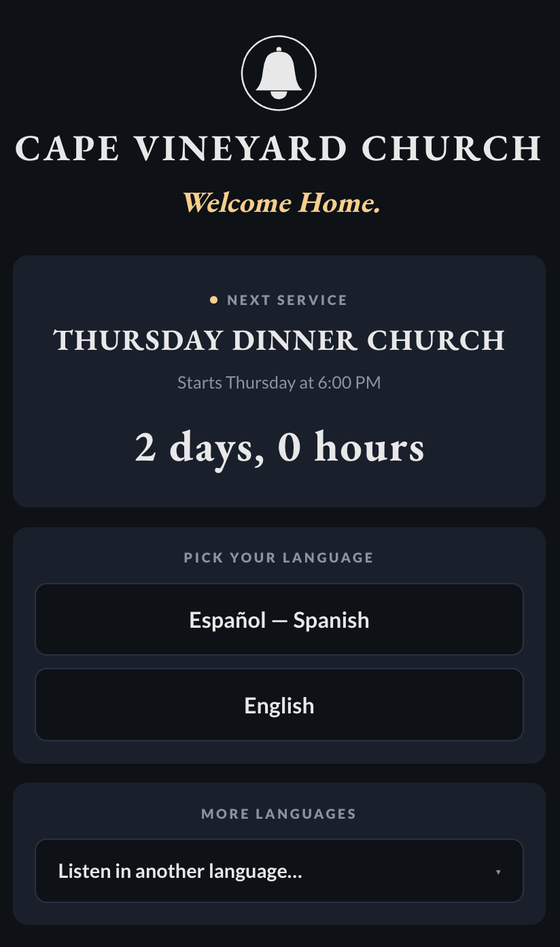
This is the pattern for the family you already know is coming, the guest who missed the QR moment, and anyone who finds a personal invitation warmer than a code on a screen.
3. Listeners at home, via the same link
Because the listener page is an ordinary web page, it isn’t limited to people inside the building. To be plain about what this is: it’s the live translation feed itself — captions and spoken audio from the service as it happens — not captions embedded inside a video livestream.
- Share the same short link with homebound members or family following from a distance.
- They open it in any browser — phone or computer — and pick their language, exactly as if they were in the lobby.
- As the service runs live, they follow the captions and can turn on the spoken voice in their language.
What your congregation experiences
A guest’s whole journey is: camera → QR code → a web page with your church’s name on it → tap a language → captions. If they arrive early, the page shows the countdown to the service and starts on its own when you go live. Listeners who prefer audio tap once more and hear a natural voice in their language — and it keeps playing with the phone locked in a pocket, the way people actually listen. After the service, the message is still theirs: sermon notes and the full transcript, in their language.
A real Sunday: Cape Vineyard Church
None of this is hypothetical. Cape Vineyard Community Church in Cape Coral, Florida runs live translation at every service — Sunday mornings and the Thursday evening Dinner Church — with no headsets, no interpreter booth, and no app. Spanish-speaking families are a core part of the congregation, and before translation, part of the room was left to piece the sermon together or depend on a family member whispering a translation all morning.
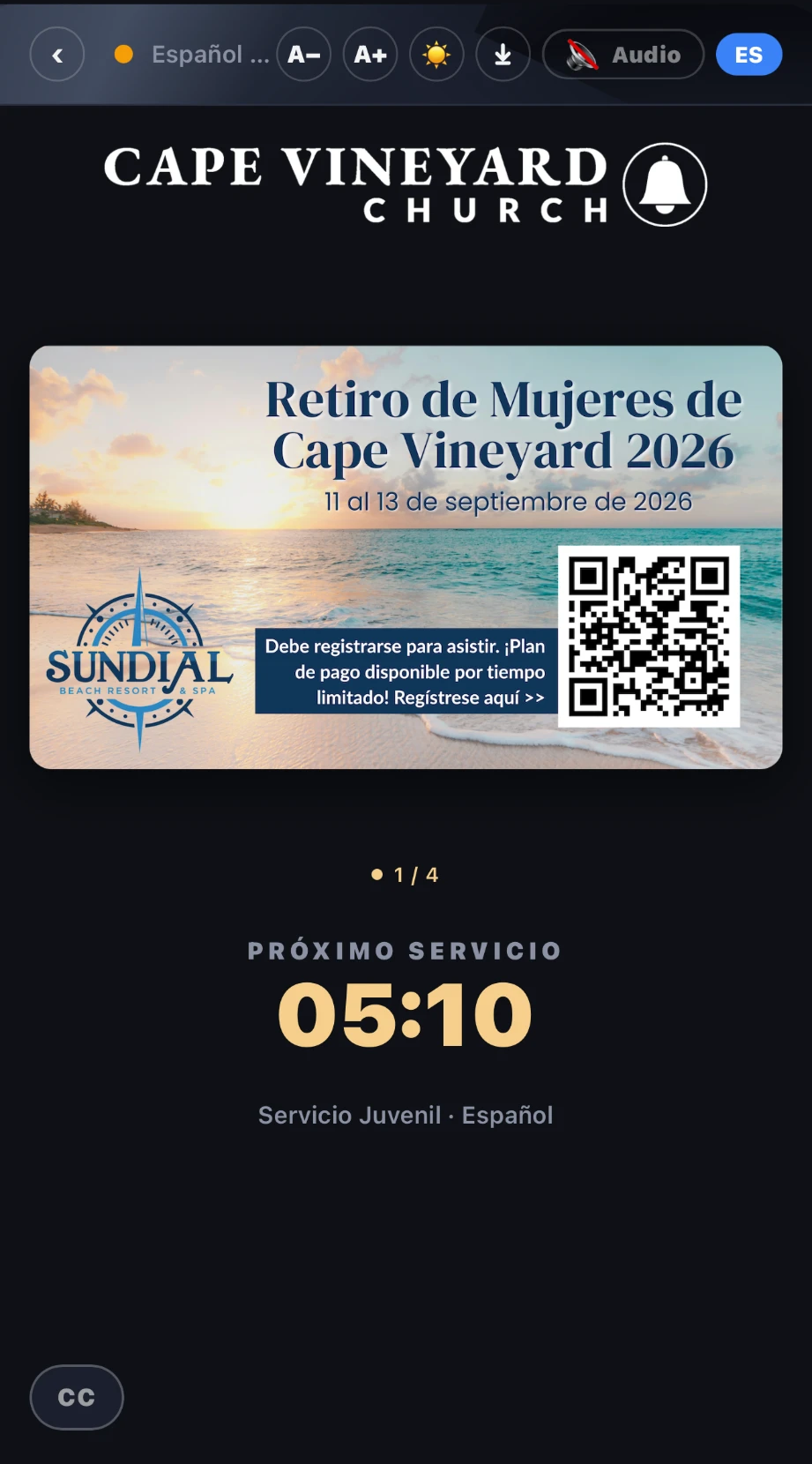
Their Sunday flow is exactly the setup this guide describes. The AV booth opens the broadcast console in a browser and goes live on the same mic feed the sound board already carries — no new equipment was purchased. Guests scan a printed QR code in the lobby; Spanish speakers tap Español, anyone else picks from the full list. As the pastor preaches, each phone shows the sermon in that guest’s language — live captions with the original English alongside, a natural spoken voice, or both. When the service ends, the booth ends the broadcast: nothing to collect, nothing to sanitize, nothing to re-charge for next week.
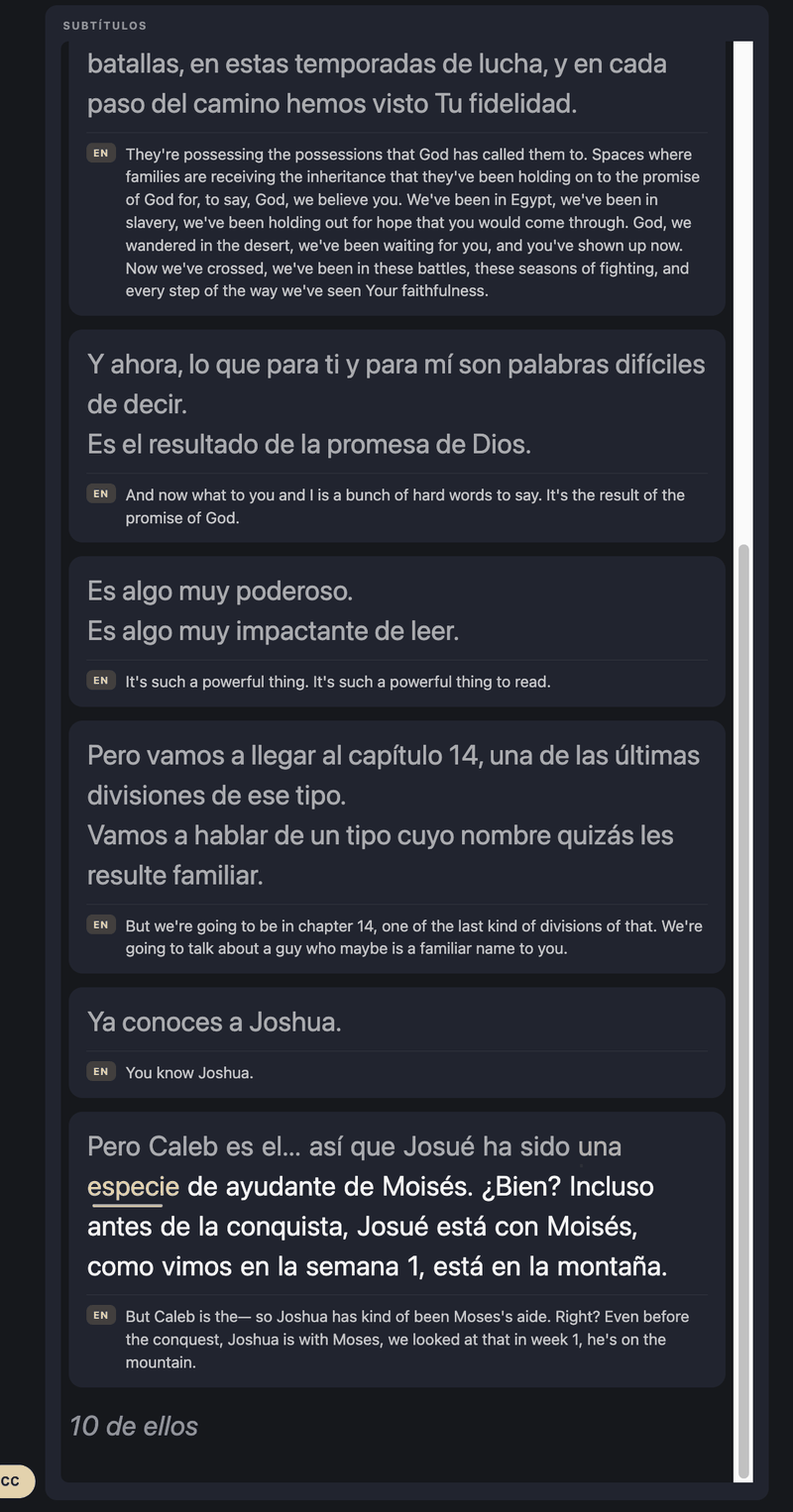
The full story — what they run, what it took to set up, and the staff’s own words on what it has meant for their Spanish-speaking families — is in the Cape Vineyard Church case study.
Choosing which languages to offer
Start with the languages already in your pews, not a wish list. Your greeters and small-group leaders know who is translating informally for family members today — that’s your real demand. Spanish, Mandarin, Korean, Vietnamese, Tagalog, and Portuguese are common first choices in U.S. congregations. You can always add more later; the cost of an extra language is near zero when it’s software, not headsets and staffing.
We wrote focused walkthroughs for the two most common starting points: Spanish translation at church and Korean translation at church.
Captions and accessibility for Deaf and hard-of-hearing members
Here’s the part many churches discover only after they start: translation and captioning are the same broadcast. The same QR code that serves your Spanish-speaking families serves your Deaf and hard-of-hearing members — English speakers simply pick English and read the sermon as live text. Captions arrive as complete, readable sentences rather than a jittery word-salad that rewrites itself, and each guest controls their own screen: the A−/A+ buttons set the font size, and they can scroll back to catch anything they missed, at their own reading pace.
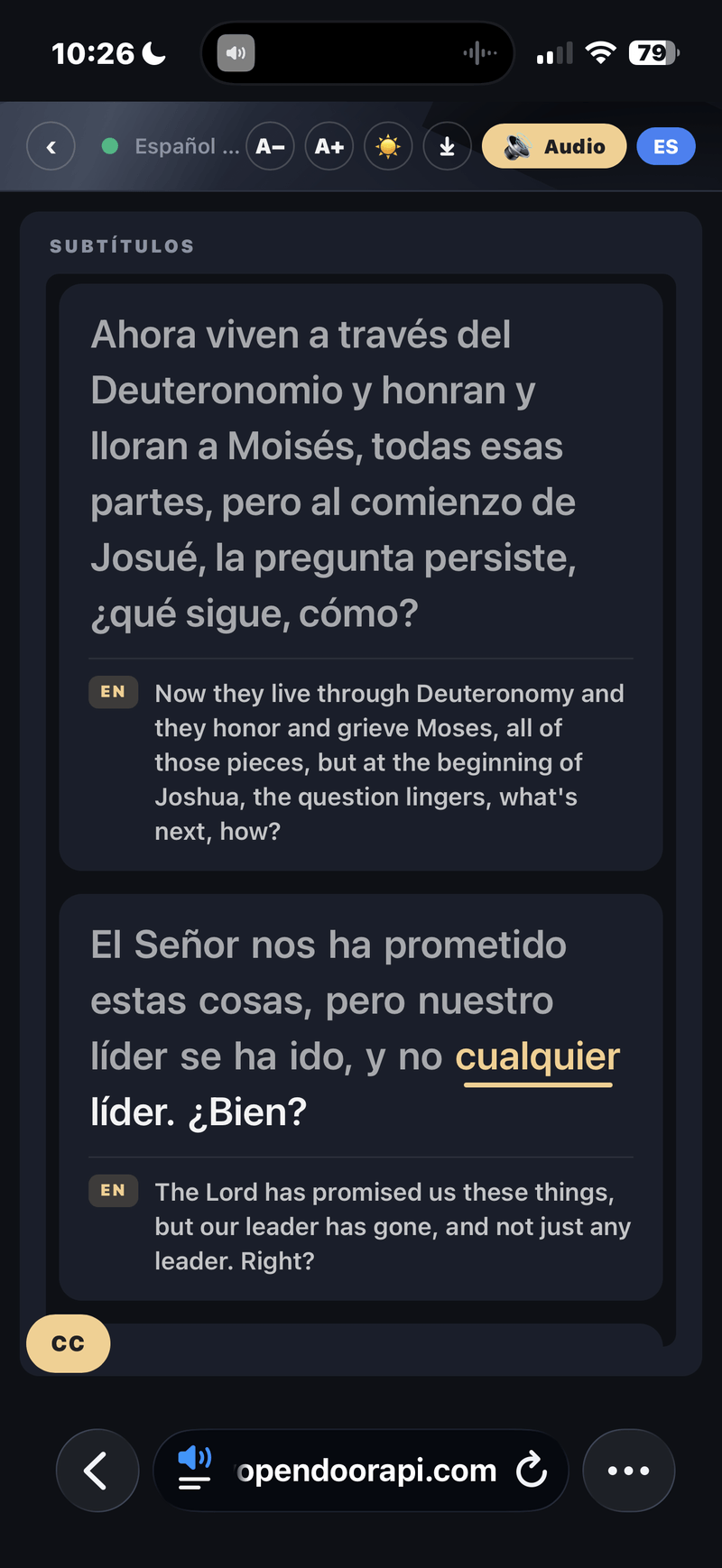
The circle of people this serves is wider than most churches expect: Deaf members, older members with age-related hearing loss (the most common accessibility need in most congregations, and the least announced), second-language listeners who follow spoken English but miss pieces at sermon speed, and everyone at the edges of the room — the cry room, the overflow, the seat under the balcony speaker. Captions serve all of it without anyone having to ask.
One straight word about the legal side: live captioning is a widely adopted way to support accessibility efforts, but whether the ADA or any other standard applies to your congregation is a question for your own advisors — a captioning tool provides the capability, not legal guidance. The full accessibility picture, including who benefits and what it costs, is in our church captioning guide.
The one thing that matters most: faithfulness
Generic tools like web translators or video auto-captions translate word-by-word, quietly paraphrase, and have no idea what your congregation’s vocabulary means. In a sermon, that’s not a rough edge — it’s a problem. “Yahweh” should stay “Yahweh.” A Scripture reference should arrive intact, not smoothed into something the speaker never said.
This is why purpose-built church translation uses a controllable glossary and a faithful engine that delivers complete sentences without reinterpreting the speaker. (Ours is MODVOICE, the engine inside MyOpenDoor Translate — it fixes how the words were heard and never changes what was said.) When you evaluate any tool, ask the blunt question: does it ever rewrite, summarize, or complete a thought the speaker didn’t finish? It shouldn’t.
Hymns, responsive readings, and Scripture
A service isn’t only a sermon, so a word on the other parts of the liturgy — this is operator practice, not product magic:
- Worship music and hymns. Sung lyrics over a full band are a very different audio problem from one person preaching, and translated song lyrics rarely land the way the songwriter intended. The practical move is the console’s Pause button: it temporarily stops sending audio without ending the service, turns yellow while paused, and one more tap resumes for the sermon. Many churches simply pause during the music set and resume for the message.
- Responsive readings. Tell whoever leads them to speak at a normal, deliberate pace into the mic — the congregation’s half of the exchange won’t be on the board feed, and that’s fine; listeners follow the leader’s lines. If your readers are slow and deliberate, the console’s Careful pacing setting waits longer through pauses so thoughts aren’t cut off.
- Scripture quotation. This is the hardest test of any translation tool and the place paraphrase hurts most — a Scripture reference should arrive intact, not smoothed into something the speaker never said. Read Scripture aloud in your dry run specifically, and put recurring book names and key theological terms in the glossary so they render correctly every time.
Common mistakes to avoid
- Feeding it bad audio. A mic across the room picks up the room. Use the speaker’s mic or a board feed.
- Skipping the glossary. Names and theology terms are exactly what generic translation gets wrong. Ten minutes of glossary work fixes it permanently.
- Skipping a dry run. Do a 10-minute test on a weekday before you rely on it Sunday.
- Forgetting to show the QR early. Put it up before the service, not after the sermon starts.
- Treating it as a gimmick. Tell your multilingual families it exists — promotion is half the value.
When things go wrong: troubleshooting and backup plans
Every AV lead’s real question is the failure question. Here’s the honest playbook:
- The pre-service test is the backup plan. Most Sunday failures are Tuesday problems that nobody looked for. The ten-minute weekday dry run — real speech, Scripture read aloud, captions checked on a phone in the room — catches the wrong mic input, the weak booth connection, and the missing glossary entry before anyone is depending on it.
- No captions? Check the audio feed first. If the console’s Signal bar reads “Microphone idle” while someone is speaking, the audio isn’t reaching the engine — almost always the wrong input selected in the Microphone dropdown, or a muted channel on the board feed. The Health indicator on the console is green when everything’s flowing, and you can report an issue from there if it flags one.
- If the booth Wi-Fi is shaky, wire the booth. The booth device is the one connection that matters most, so give it a wired connection where you can. Guests aren’t on your booth connection at all — they use their own data or your guest Wi-Fi, so a crowded guest network doesn’t take the broadcast down.
- If the internet drops mid-sermon. The booth reconnects by itself, with no click from your volunteer, and a hiccup at the hearing, translation, or voice service behind it swaps to a backup automatically; listeners see a “reconnecting” badge and their page picks back up. Words spoken while the connection is down are not replayed, so a wired booth connection is the best insurance.
- If the booth device itself dies. Open the console on a second device — a tablet, another laptop — and tap Take Over Live Controls to move control to the device in front of you. Only one device drives the live service at a time, and this is the built-in path for switching.
- If the sermon runs long. Scheduled services end automatically at the window’s end; the +10 min button extends a running service in ten-minute taps so an automatic end never cuts off a closing prayer.
- If a provider has an outage. Live translation runs on top of speech and translation providers, and providers have outages — ask this question of any vendor. Every stage of our pipeline runs with a hot backup, so a vendor outage doesn’t silence your service: the next sentence arrives and the service keeps going.
How much does it cost?
Interpreters cost per service, per language, indefinitely. Hardware costs up front per receiver — before the interpreter you still have to pay. Platforms are a monthly subscription based on how much you use it: plans start at $19.99/month and a church running one language every week is on Starter at $49/month billed annually, every feature included, and adding a language adds no hardware and no staffing. We broke the whole comparison down in how much church translation costs, or see full pricing for current plans.
Frequently asked questions
How do you translate a church service in real time?
Three ways: a human interpreter (live, one language per interpreter), dedicated interpretation hardware (an interpreter broadcasting to radio or infrared headset receivers), or an AI live-translation platform that turns the preacher’s words into captions and a spoken voice on each listener’s own phone. Most churches starting today choose the platform route because it covers many languages at once with no hardware to buy or hand out.
Do guests need to download an app or wear a headset?
Not with a phone-based platform. Guests scan a QR code, a web page opens in their phone’s browser, they tap their language, and captions begin. If they want to listen, they tap the audio button and hear a natural voice in their language through their own earbuds.
Which church translation app or software should we use?
Compare four things: how many languages you get on the plan you can actually afford, whether spoken audio is included or costs extra, what you are left with after the service ends (a transcript, sermon notes, or nothing), and how much work Sunday morning takes for whoever runs the booth. We put the five options churches actually choose between side by side, with pricing and language counts taken from each provider’s own published pages, in our guide to the best church translation apps.
What equipment does the church need?
The microphone you already preach with (or a feed from your sound board), a laptop or tablet at the AV booth running a web browser, and an internet connection. There is no hardware to buy, rent, or distribute to the congregation.
Do listeners read captions or hear a voice?
Both, and each listener chooses. Captions stream live on screen, and listeners who prefer to listen can enable a natural spoken voice in their language. On MyOpenDoor Translate, standard voices are included on every plan; custom cloned voices (a voice trained to sound like your own pastor) are an optional paid add-on.
How many languages can we offer at once?
With interpreters or hardware, each language costs another interpreter and another channel. With a platform, one broadcast serves every language simultaneously — MyOpenDoor Translate delivers live captions in 190+ languages and natural spoken voice in 60+, and each listener simply picks theirs.
How much does live church translation cost?
Human interpreters cost per service, per language, every week. Hardware systems cost up front per receiver, plus the ongoing interpreter. Platforms are a monthly subscription — MyOpenDoor Translate starts at $19.99/month with every feature included. See our church translation cost guide for the full breakdown.
What’s the delay between the preacher speaking and the translation?
Captions arrive as whole, complete sentences about a second after the words are spoken, and the spoken voice follows just behind the captions. Listeners follow the same sermon at the same moment as the rest of the room, not a delayed summary afterward.
How accurate is live church translation?
MyOpenDoor Translate quotes the measured number, not a ceiling. Every service is graded afterwards against the church’s own recording: on recent services, 89–93% of content words were heard right in English, and 92–94% of caption meaning carried into Spanish. The honest failure modes are jokes, idioms, and unfamiliar proper nouns — which is exactly why the glossary exists: load your names and theological terms once and they come out right every time.
Does it work for people at home?
The listener page is an ordinary web page, so anyone you share the link with can open it in their phone or computer browser, pick a language, and follow the live captions and audio — they don’t have to be in the building. Note this is the live translation feed itself, not captions embedded in your video livestream; homebound members follow the audio and captions directly from the link.
What happens if something fails mid-service?
Ask this of any vendor. Live translation runs on top of speech and translation providers, and providers have outages. Every stage of our pipeline runs with a hot backup, so a vendor outage doesn’t silence your service — the next sentence arrives and the service keeps going.
Try it on your own service
The best way to know if it works for your room is to run it in your room. Start a free trial and you can run the seven steps above on your own board this week. If you’d rather have us on the line for the first one, book a free live test and we’ll set you up with a temporary link, run a real service with you, and review the transcript together afterward — no commitment either way.
And if you have not seen it yet, start there: the two-minute demonstration on our home page needs no signup — just your phone next to you.